Expose the controls your game understands
Map speed, proximity, weather or threat to a small set of meaningful parameters. Smooth continuous changes, trigger actions deliberately and keep sound-design controls editable.
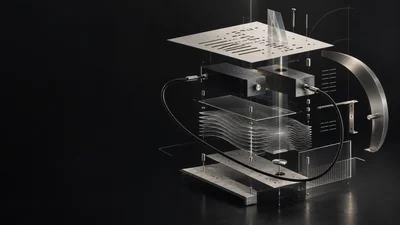
Map speed, proximity, weather or threat to a small set of meaningful parameters. Smooth continuous changes, trigger actions deliberately and keep sound-design controls editable.
Use seeds, scales, motifs and rhythmic rules to create alternatives you can reproduce. Change density or timbre as tension rises, and choose when a new phrase takes over.
Explore SymbolicExplore room responses, reverb, stereo placement and source distance. Design the desired cue first, then test the spatial model and update cost inside the intended game.
Interactive browser studies
Each scene exposes its own gameplay controls while the instruments stay internal. Inspect the parameter mappings and save or restore the top-level controls.
Strike a gong at its center or rim, change the mallet and damp its ringing. Learn how object properties can drive excitation and resonance, with the source heard on its own.
Open Resonant ObjectsPlace an instrument and stereo receiver in a room. Compare reflections and decay as placement or surfaces change, with feedback while the next response is prepared.
Open Room and ReceiverMap Health, Proximity and Threat to filters, damping and timbre. Change density over the same seeded harmony, switch layers, or regenerate a musical take at a cycle boundary.
Open Adaptive ScoreRelease balls from a hose and place or tilt planks in their path. Contacts play independent resonators, with stereo pan following horizontal position. Rolling creates discrete contact pulses; continuous friction and portable engine contacts remain additional work.
Open Physics PlaygroundChoose a scene, the player actions that change it, and the sound you want. Set constraints for musical range, response time, voice count and performance.
Start with existing instruments and effects. Ask an agent to connect them, author musical rules and expose gameplay controls. Create a new module when the scene needs a reusable sound behavior the library does not yet provide.
Connect game state to the module’s parameters and events. Audition smooth transitions, rapid retriggers, saved state and alternate seeds while the scene runs.
Check latency, CPU, memory, interruption and lifecycle behavior on your target hardware. Keep a deterministic scene replay so changes can be compared.
Interactive browser prototype
Click landmarks to trigger notes and change an evolving soundscape. Geometric and immersive views demonstrate interaction with one compact instrument; the specialized showcases above build on this idea with separate instruments and effects.
Current compact instrument demonstration
A sparse melodic pattern and soft wavetable texture establish the space.
Click a landmark to trigger a note and change tension, distance or the apparent acoustic space.
Slow modulation keeps the timbre and stereo field moving. A new seed selects another constrained phrase without restarting the environment.
The original demo uses a compact wavetable voice and prepared melody variations. The browser studies above use full instruments, explicit mappings and a separate acoustic room experiment.
Try the instruments belowPlay an adaptive instrument through geometric and immersive 3D views.

Shape a struck resonant instrument through mallet, position, size and damping.

Express patterns and musical transformations as code, then send MIDI to instruments.

Morph between wave shapes and modulate an instrument’s evolving texture.
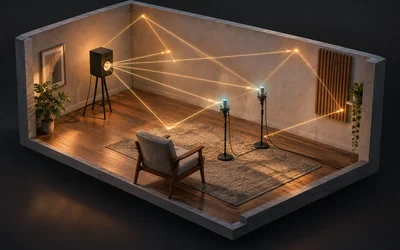
Place sources and microphones, adjust room dimensions and surfaces, and inspect the resulting response.
A game can send Threat, Speed or Impact strength while a sound designer edits the filter, damping, envelope or wavetable controls behind them. Keep continuous values, one-time events and modes distinct, with clear ranges and per-object control.
MIDI notes trigger instruments. MIDI CC can provide hands-on parameter control where the host supports mapping; gameplay can address named parameters directly. Both should reach the same sound-design controls, with an explicit policy when manual edits and game automation overlap.
Reusable modules own the sound, racks connect instruments and effects, and game scenes supply interaction. Agents can help author those pieces and prepare musical alternatives. The audio should keep working when the visuals are hidden.
Browse all gamesBring your existing engine, middleware and audio pipeline. We can work on a focused instrument, effect, musical generator or integration, with named inputs, exposed parameters and repeatable tests.
Our agent-assisted workflow produces editable projects. The realtime audio path stays bounded; language-model requests and musical preparation happen outside the callback. We agree the target platform and acceptance criteria before claiming compatibility.
Explore Maru EngineLearn how modulation, realtime processing and saved parameter state support interactive audio.

Audio programming · Free guides · Learn at your own pace
Write, test and refine a small audio effect with a clear musical purpose.
Explore the learning track
Denormals, allocation, smoothing and block boundaries
Read the guide
Making saved sessions come back exactly as they were
Read the guide
A pad that never sits still
Read the guide
Keep the guides beside your next project. Read the free book at your own pace, with links to try the experiments online.
Download the free bookFAQ
Share the scene, engine, target platforms and the gameplay signals you can expose. Tell us what should change, what must stay reproducible and the performance budget.
Sign in to share your game-audio brief.